Oh matzah; You never crash while uploading a huge file overnight, you never corrupt a couple hundred gigs of quicktime files –Why can’t everything be like you?
I’m going to break off a narrow strip of matzah and eat it very slowly to match the length of all these progress bars I’m watching.
Today I received one of those marketing emails from Amazon of the sort that I usually ignore, but this one was trumpeting the preorder availability of Jaws on Blu-ray (also includes DVD and some online streaming version that won’t play on my Apple TV). Exciting! At the risk of seeming super-commercial I’m going to talk about this 1.
For all the criticism and blame Jaws receives from cineastes 2 for ending the era of 70s studio auteur 3 films, the film responds by just being unassailably great. There are some magical moments –a child imitating his dad’s serious poses is my favorite bit (and I was happy to see it referenced by J. J. Abrams in his Ted Talk as an influence ), followed closely by Robert Shaw’s monologue about the sinking of the U.S.S. Indianapolis. The Jaws theme is well known, but the rest of the score is also memorable –the jaunty ‘Out to Sea‘ comes to mind. The production was plagued with technical problems, which I hope the extras on the disc expound upon at length.
The chances of me buying this disc are pretty high.
It also seems the price has dropped on the Scott Pilgrim vs. the World Blu-ray/DVD Combo. If I didn’t already own this, I’d buy it in an instant. This amazingly-risk-taking film is mostly fantastic, and where it falls short I credit it greatly for trying. A very fun film –artistically bold, fast-talking, with a screwball comedy feel. A great looking and sounding disc, and now at $7.99 it’s cheaper than going to the theater.
This concludes me posting sales-y stuff for today. But I do think both of these films are worthy of multiple viewings, especially by filmmakers.
Update — as of 3/28/2012 at 5:50pm, the deal’s over. Both of these rigs have now doubled in price, which brings them back in line with their pre-deal pricing.
Since I plan to soon hook a follow-focus up to my DSLR, I’m going to need a way to mount my camera to standard 15mm rails. Special thanks are due to the Cheesycam website for today posting a link to two different rails DSLR rails mounts that are (for the moment) incredibly low priced at around $35-40 with shipping.
If you’ve been thinking about a rails system, you might do well to check these out –I don’t mean to add a false sense of urgency into the mix, but having looked at such items for a while this pricing feels like some sort of anomaly. It wouldn’t surprise me if this price drop only lasts for a very short period of time.
It also wouldn’t surprise me if after a bit of experimentation with this cheap rails mount that I decide a higher quality unit is worth the 10X greater expense. But $36 fits in my experimentation budget nicely.
Canon DSLRs have always had pretty soft video, relative to the amount of detail that can be present in a 1080p frame. For example, here’s a test of the Canon EOS 7D aimed at a 4k test chart, the result looks more like the kind of detail that can be captured by a good 720p camera, not really 1080p, and with annoying moire and aliasing issues. Panasonic’s micro-4/3 format camera, the GH2, especially with one of the higher-bitrate recording hacks installed, looks to record much higherdetail within its 1080p files –unfortunately it has a smaller sensor than APS-C (7D, 60D, T2i, T3i) or full-frame (5Dmkii), otherwise I’d have sprung for one long ago.
I’ve always assumed the relatively soft detail recorded by DSLRs was due to the fact that these still cameras lacked processing power to scale the entire sensor’s imagery fast enough to keep up with a 24 or 30 frames-per-second record rate, and instead cheat their way down to a 1080 frame in a faster manner by binning, line-skipping, or otherwise not using every pixel of each frame. But if that’s the reason, and Canon’s newest DSLR is actually scaling the full ~5k image captured at its sensor down to 1080 in a sensible way, the result should look fabulous. If such cameras could use the entire sensor just as they do when shooting a full-resolution still image, and then scale it down to 1920×1080, the resulting image should rival that of any available 1080p video camera (or at least be close to the look of video captured by Canon’s $16k C300). That’s what I hoped to see, more or less, when video clips from Canon’s new 5D Mark III started hitting the net.
Unfortunately, the examples posted so far underwhelm. It appears that the new DSLR is scaling the frames more sensibly, resulting in eradication of moire and aliasing, but unexpectedly the resulting images don’t appear to contain more detail than frames captured by its predecessor, the 5D Mark II. One possible reason may be that the camera by default applies excessive noise reduction as it records video, especially when recording video at high ISO settings. If that’s the case, maybe we’ll see better examples when people post more low ISO video with noise reduction disabled (if that’s possible).
If the culprit is excessive noise reduction, or other intentional softening of the image, it’s also possible that a bit of sharpening of the resulting imagery may clear away the blurring and bring back lost detail (and noise). One promising test posted to the net by Cinema 5D that compares the 5D Mark III imagery with sharpening to that of the Red Scarlet-X, and Philip Bloom’s “My first 48 hours with the Canon 5DmkIII” post, makes this look like a promising area to explore. There’s also this test. Information is starting to come out. Maybe the detail is there in Canon 5D Mark III footage, waiting to be recovered in post or via an on-camera sharpness setting?
I’ve been hoping Canon’s newest full-frame DSLR would again leapfrog the competition in the video space, demolishing aliasing, moire, and recording a beautifully sharp and maximally detailed image. 2 out of 3 ain’t nothing, but that #3 is pretty important. I and the lenses I used to use daily when shooting 35mm film want an excuse to move up to a full-frame DSLR, but for now I’m just watching and waiting to see how things develop. Better examples may be coming from the 5DmkIII (I’m looking forward to Philip Bloom’s review), and the GH3 and Canon’s promised 4k cinema DSLR are yet to be released. NAB is right around the corner.
Groupon today features a deal for an “$18 movie outing for two” to Grauman’s Chinese Theatre (the big screen and their 6-screen multiplex). Two tickets to a film, drinks, popcorn, $18. Given that the normal cost of a ticket to a screening at that theater is $13.75, that I love the cheesy orientalism of the main screen and its genuinely non-ironic grandness, and that it’s not far from home, I should not have mixed feelings about the deal.
But there’s a catch –programming that is incompatible with my tastes. Whoever picks the films that show on the main screen at Grauman’s Chinese Theatre has a unique gift for choosing films that I have no interest in watching. It’s amazingly consistent 1. Not only do I have no interest in watching what they show there, I often recoil from just the posters, and wonder where they find these flicks. Maybe that will change with the new owners. Maybe they’ll let me program the theatre –surely it’s about time Videodrome and Rubin and Ed play together at a grand movie palace. Cult classics featuring cults, a theme night. That ought to goose ticket sales more than a groupon. Right?
I’m probably going to buy into this deal just because I love that theatre and will undoubtedly end up going there a couple of times this year regardless what they’re showing. Maybe I’ll be surprised by how good the swill is and will stop being such a snob.
OK, there are exceptions, and I usually jump at the chance to go there and see them. ↩︎
EOS HD has put up a summary of results from a grading test of footage from the new Canon 5D Mark III. It sounds as though this is all footage shot at 6400 ISO, and they’re impressed. The original footage and test can be found on Sam Morgan Moore’s blog.
I’d expect now that Canon’s put in the processing power to actually scale the entire image captured on their full-frame sensor in a sane fashion (i.e. no binning or line skipping, but actual scaling) before recording into a quicktime file, that may make a huge difference from the DSLR footage we’ve all been shooting for the past few years –I expect no more moire, and much higher detail. It’s scaled from a sensor whose resolution is within the realm of the Red Epic, but whose size and likely light sensitivity is larger. I know the final result is a 1080p quicktime file and not 5k of RAW, but it still could be very very nice.
I look forward to seeing more test footage surfacing on the net, I’m particularly interested in any tests at more optimal ISOs and with noise reduction disengaged or minimized (it likely softens imagery). And I’m also looking forward to the thoughts of professional DSLR cinematography expert and C300 owner Philip Bloom on the matter, as he’ll undoubtedly push the camera to its limits and make the comparisons I’m most curious about. I want to see how sharp and detailed the imagery from this 5k+ resolution sensor scaled to 1080p can be. I’m curious to see how it compares to C300 footage and, dare I say, scaled footage from Red’s Epic-X or Scarlet-X. If Canon’s not taking shortcuts when scaling the full image from their sensor, and the 90mbps i-frame encoding preserves enough detail, it could look amazing.
It was alternately fun and frustrating trying to evoke and approximate the production values of an ad campaign on which Apple undoubtedly spent millions. There are only 8 shots in the piece, and the end result looks simple, but filmmaking is always a surprisingly tough slog. If you’re curious how we made the ad, read on.
tools
All but the last shot involved combinations of the following equipment:
A Canon 7D DSLR – shoots great video for the price, with a large sensor
Canon EF 50mm f/1.4 USM lens – a fast lens with creamy bokeh
Canon EF 20mm f/2.8 USM lens – a fast rectilinear wide-angle with a very close minimum focus distance
SmallHD DP6 monitor – This small 720p HD monitor is an essential focusing aid when shooting with the 7D
A Kessler “Philip Bloom Signature Edition” Slider – quick to setup, good for achieving smooth linear movement
Kino Flo Diva 400 flourescent light panels – for soft lighting
150 and 300 watt Arri lights, for harder – directional lighting
Z96 LED light – small, battery powered, easy to place and dim. Add some colored gels to make quick and easy highlights or washes of color on small areas
smoke and mirrors
The camera lies all the time; lies 24-times-per-second. –Brian De Palma
Because we were pretty sure what we wanted to achieve in each shot, and knew exactly what the camera would see, we were able to put together the bare minimum of set and lighting for each setup. Filmmaking always involves a level of illusion, but the level of fakery on this shoot approached food photography levels. Make-believe is fun. Click to enlarge any of the following images.
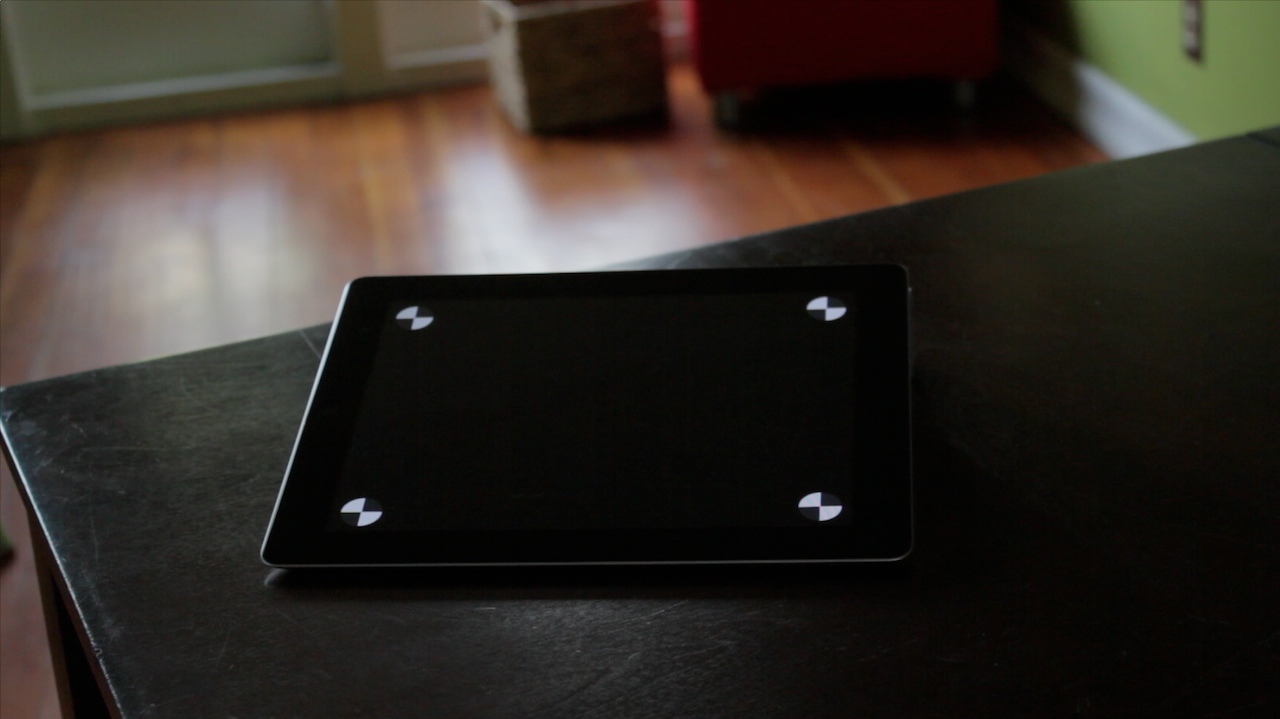
The original table top and the iPad displaying tracking markers.
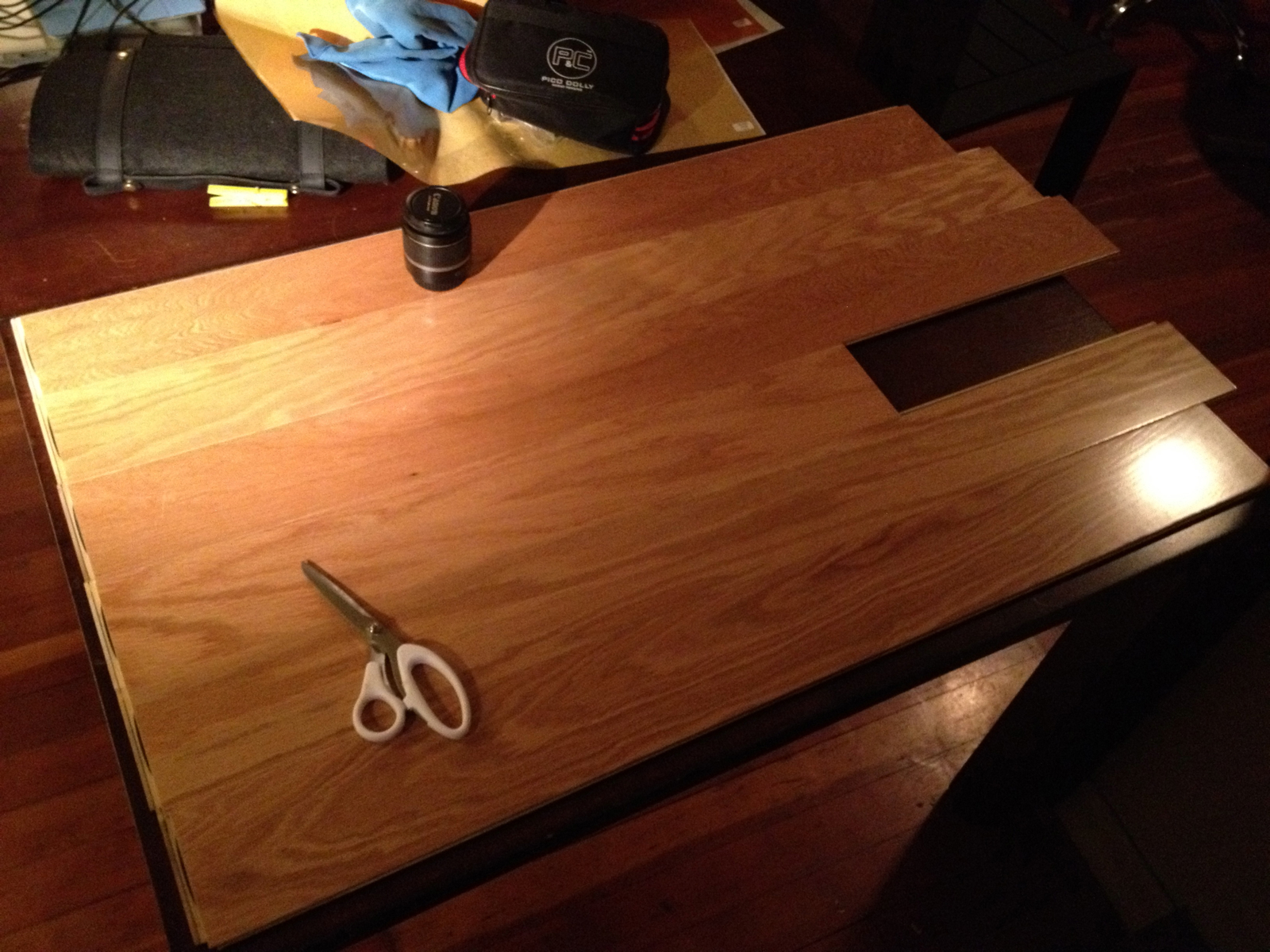
For the first shot of the piece, we decided the actual surface of the table wasn’t right. So flooring slats from Home Depot were obtained and we quickly (daylight was fast receding) made just enough of a new "tabletop" to cover what was to be visible in the frame.
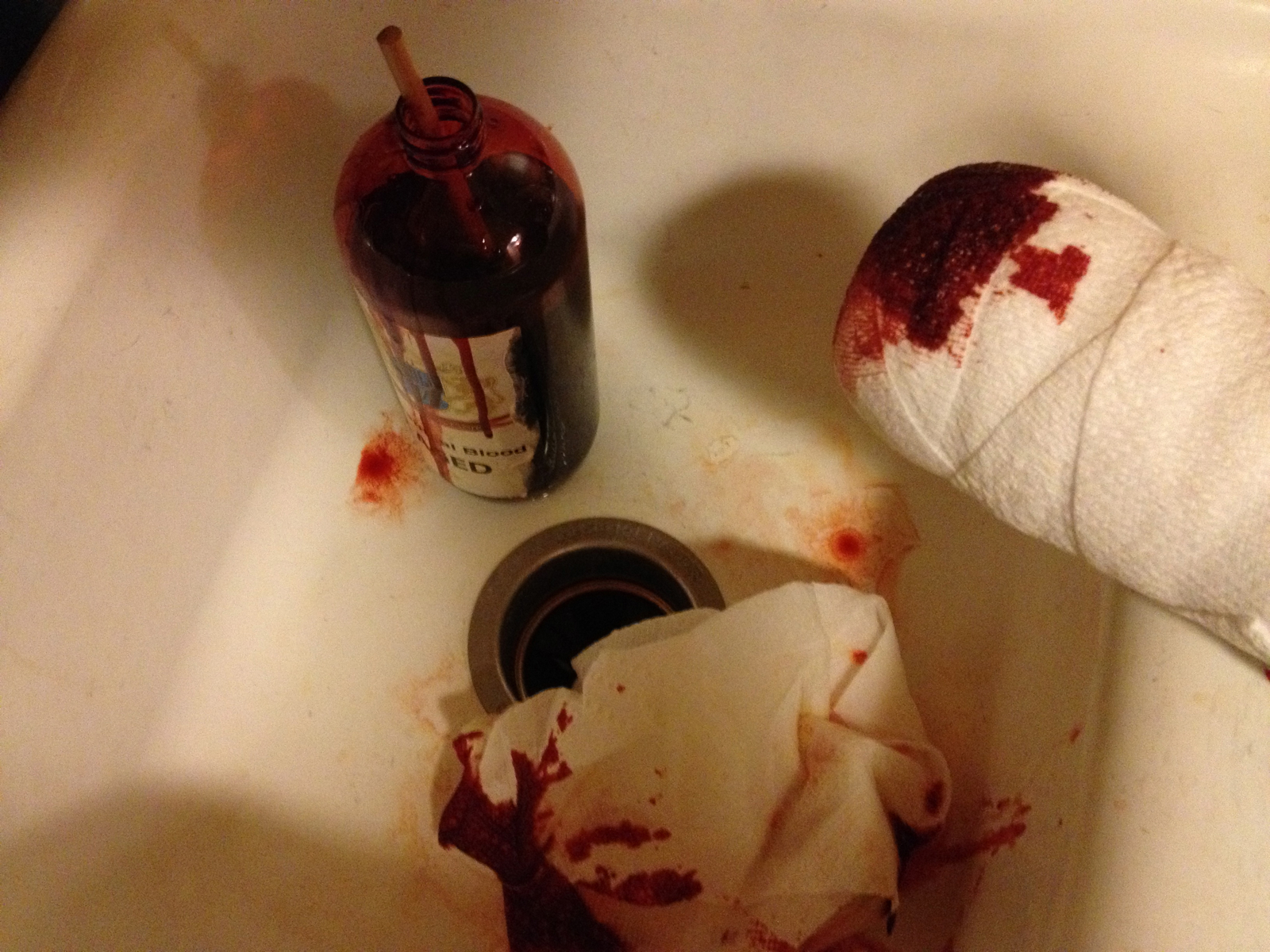
The bloody stump –a foam cylinder wrapped in gauze and daubed with fake blood. For the sake of authenticity, we used the same make of blood as was used on the Black Knight in Monty Python and the Holy Grail.
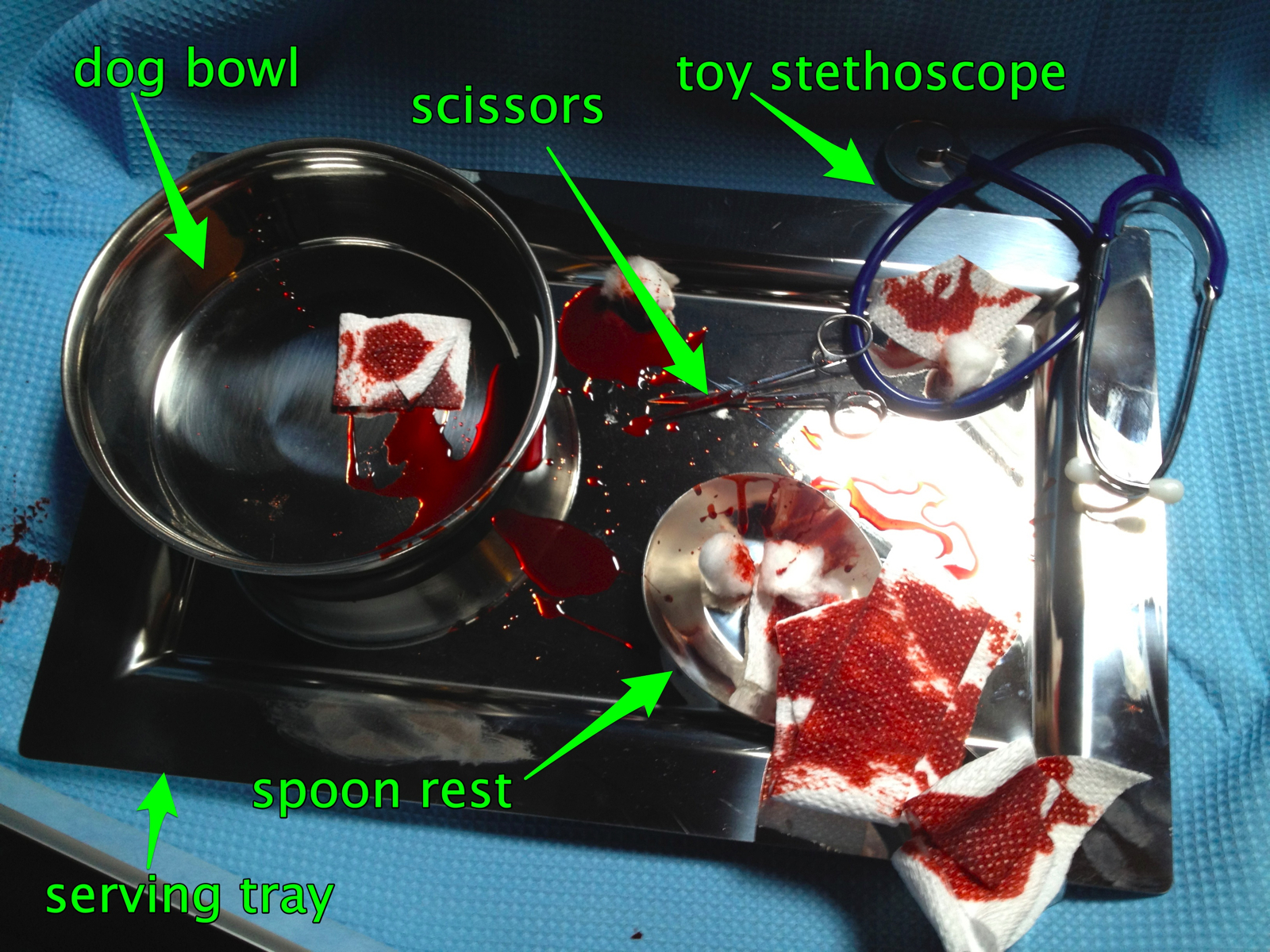
The contents of this tray have been approved for medical use in (insert name of funny-to-disparage city here), and elsewhere only for the food service and kennel industries. The handle of the spoon rest was too non-medical-looking, so we covered it with bloody gauze. Set decorating!
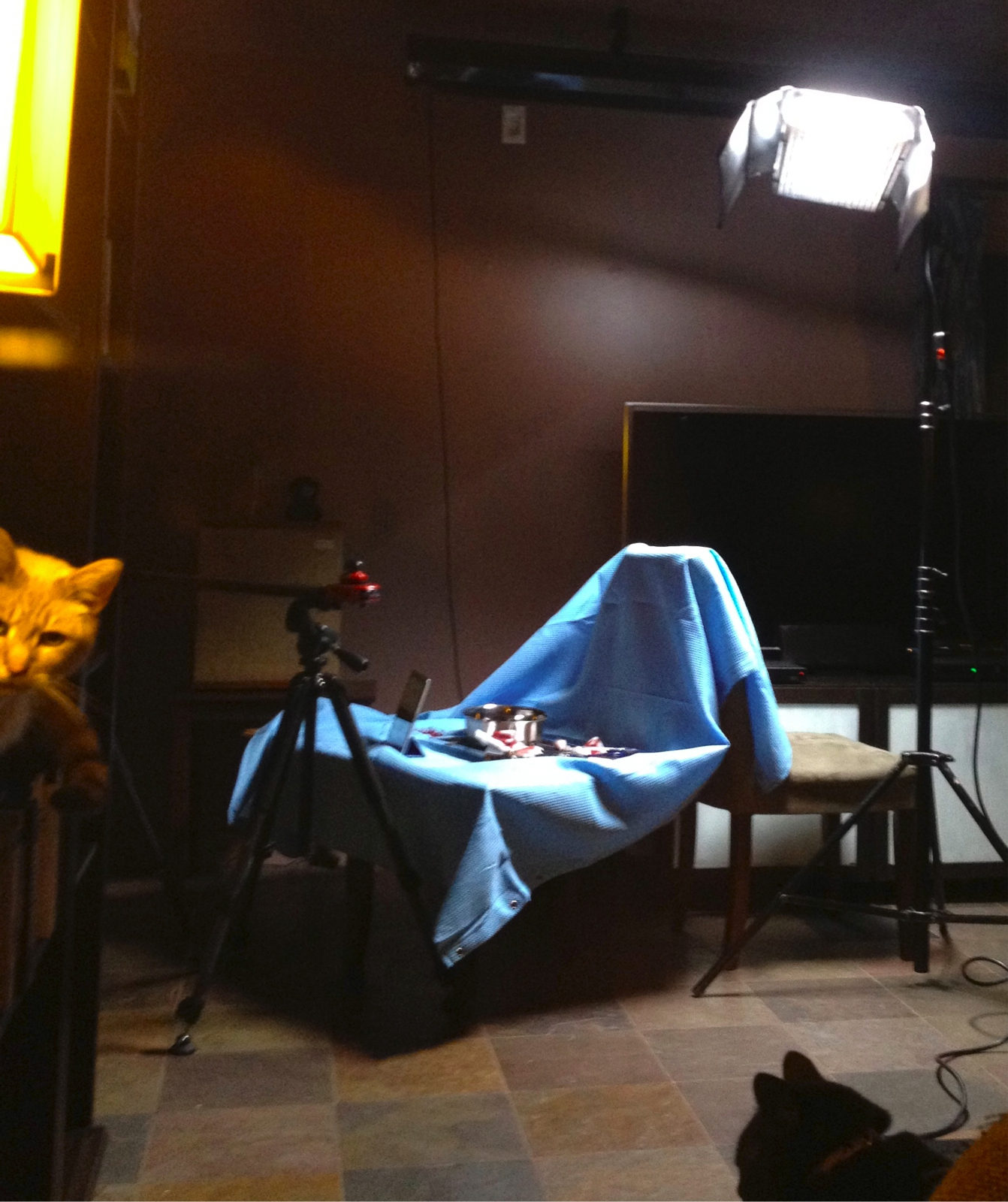
Our hospital set consisted of a blue shower curtain draped over the back of a chair and across a small table. On set security provided by a pair of trained cats.
http://zachfine.com/blog/wp-content/uploads/2012/03/blood-element-qt2.movAfter the other shots were completed, we shot blood and mud smear elements for later compositing. A piece of white cardboard served as the background, and a sheet of plexiglass was an easy-to-clean-and-reshoot surface on which to smear the various liquids. Hit play to see a couple of potential blood elements applied using the object that stood-in for the Black Knight’s bloody stump. In the end, Dane decided it would be a repeat of the same joke if the iPad screen was smeared with blood in one shot and mud in the next, so the blood elements you see here were not used. In neither this shot nor the Peasant shot did the dirty or bloody extremities touch the screen –why risk destroying an actual iPad when you can instead risk destroying your sanity by piling on compositing tasks to be done in post?
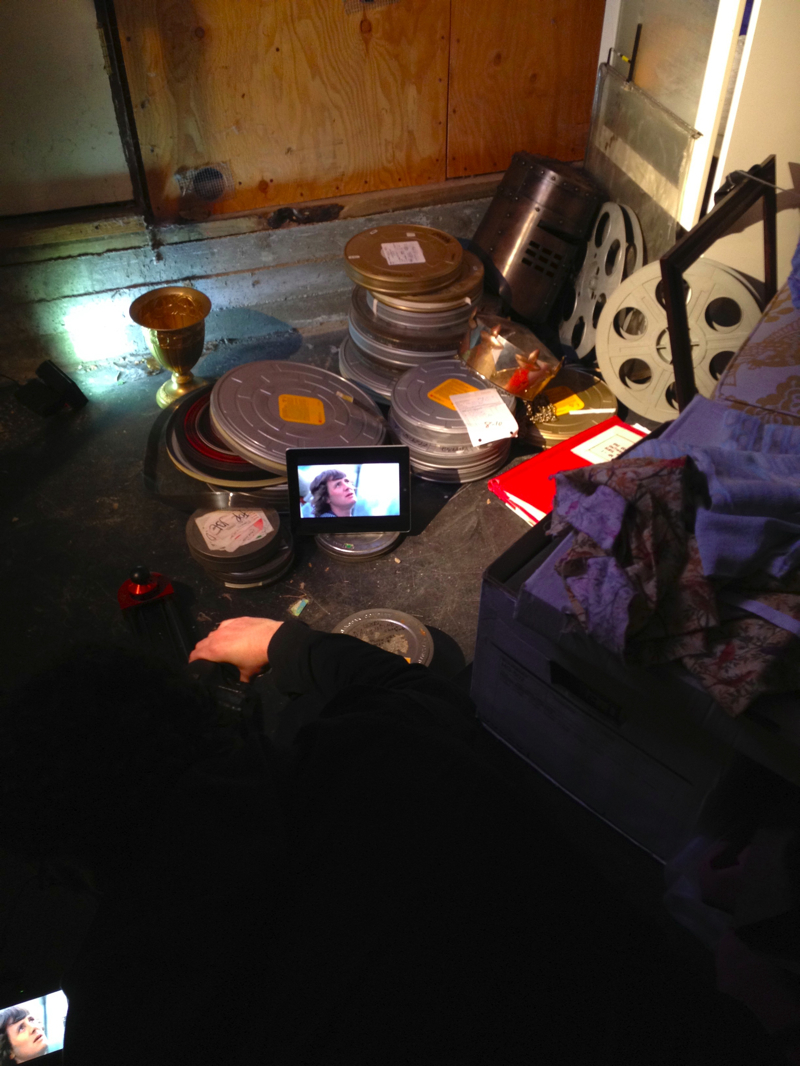
The "archives" were a carefully cluttered pile of film cans in the basement. I’m the dark mass lying on the floor, sliding and pulling focus on the camera while looking at the view on the SmallHD monitor at the extreme lower-left. The Arri’s served as a point light source, to evoke the feeling of a single light bulb in a dusty basement archive, and the Z96 unfiltered added a bit of eerie glow to the grail in the background.
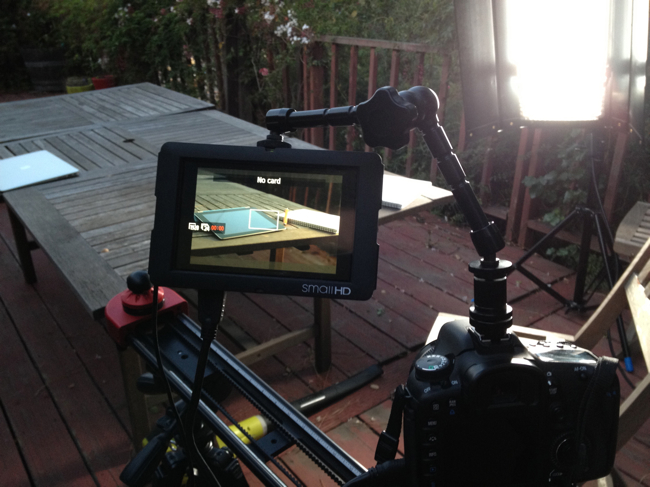
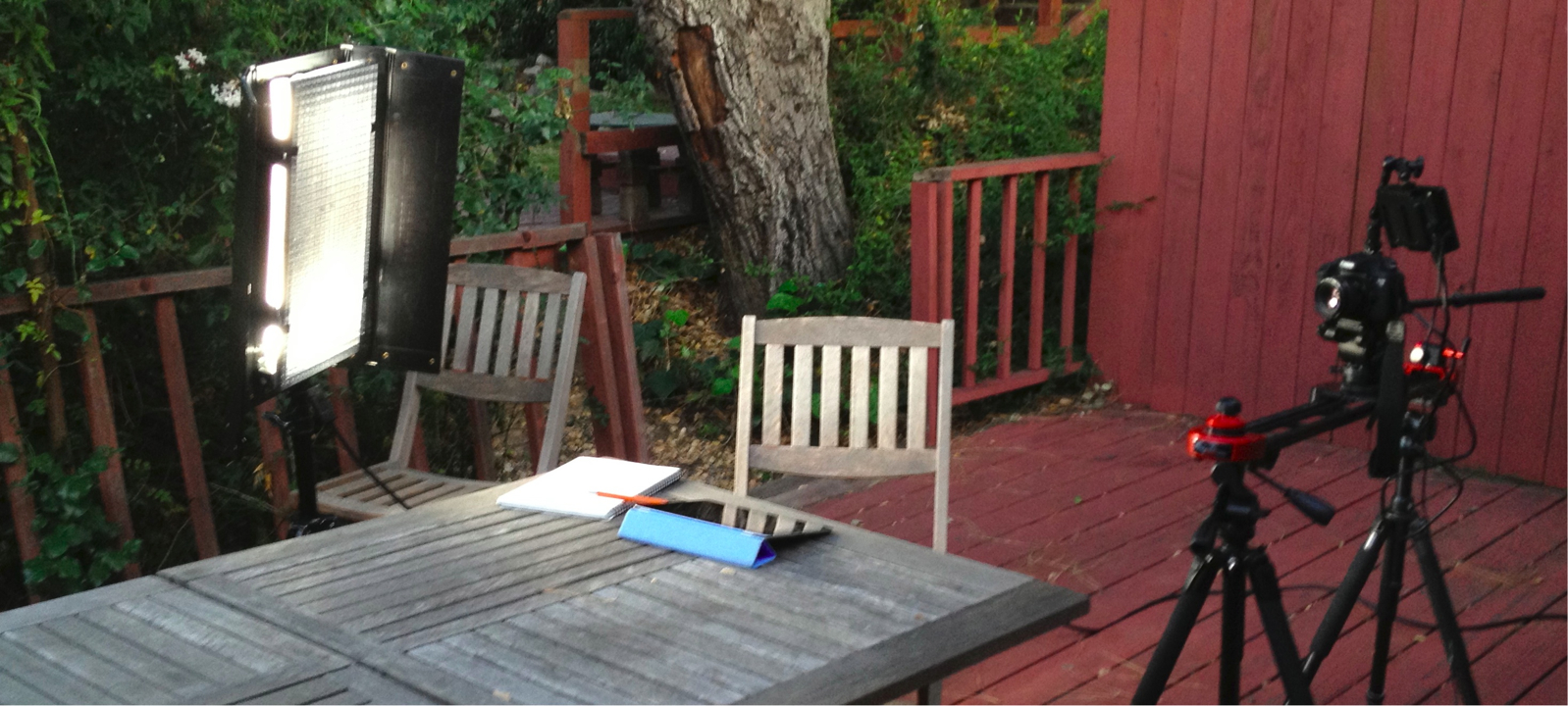
Another view of the setup for the outdoor "student" shot. The natural light had mostly faded by this point, but the Fluorescent bank placed fairly close to the subject served as a capable artificial sun. Just before the shot, I filled the mug (not pictured) with boiling water from a kettle to create steam. The Z96 LED light with an orange gel was placed to the subject’s left to fill and warm the shadows.
Post
Because we’re both editors, the distinction between production and post blurred quickly –we had capable computers at the location and a fast Firewire-800 card reader, so why not drop selected takes into a rough edit during the shoot to see how things were looking before we broke the set and moved the camera to set up the next shot? Because Dane had already procured the voiceover and music tracks before the shoot began, the ad started to take shape quickly.
Video playback was added to the iPad screens in post. There were several reasons for this decision:
In order to have a high degree of flexibility in the edit and choose footage for playback to match moments in the voiceover
Because it would be difficult to balance the lighting such that the iPad, the background, and foreground would all be exposed properly (shooting on a DSLR is a bit like shooting reversal stock in that it can look good but you have to get the exposure dead on)
The iPad would have shaken and fallen over if hands (or especially the stump) actually swiped it.
During the shoot the iPad displayed a white or black screen with tracking markers using the Chromakey app. Once the edit was together and Dane had determined which imagery from the app he wanted to appear on the iPad screens in each shot, he recorded screen captures of the app running on his iPad using the impressive “Display Recorder” app (works great, but requires a jailbroken device 1 ).
Compositing well is a very difficult task with no natural endpoint. In the best of circumstances, it ends when the result is somewhere in the “good enough” region but before the compositor has pulled out all of his/her hair. To make the composited screens acceptable to our eyes required the help of colleagues on two continents and the use of 3d matchmoving software (Syntheyes), planar tracking (Mocha for After Effects), and both Shake and After Effects for keying, lightwrap, and manual cleanup. For each shot screen playback had to be matched to the position of the screen, blurred when the iPad was not in focus, overlaid with reflections, and sometimes placed behind moving foreground objects.
The Black Knight and Peasant shots were especially problematic. The amount of blur in the Black Knight shot made for difficult tracking and keying. The Peasant shot included both difficult-to-key motion blur and the addition of mud elements.
After the compositing was done, a small amount of stabilization was done to most shots. They were pretty smooth to begin with considering that I had to simultaneously move the camera on a slider, pan/tilt it on a fluid head, and pull focus. A bit of software stabilization was needed to get the shots closer to perfection.
It was a lot of work, but judging from the behind-the-scenes material for Monty Python’s Grail film I saw in the app –we had it pretty damned easy. In the end, it’s nice to see the final product up on the web. I hope you enjoyed.
Hey Apple, please please please consider an advanced-mode toggle in iOS’s settings, off by default, to allow the .5% of users who want to risk operating their iPads in the scary world outside the app store safety net to do so without having to resort to cracking the restrictions built into the OS. We aren’t the majority of users, but we influence the purchases of family and friends, and it’d be unfortunate if we have to stop buying your wonderful hardware when you actually manage to lock it down so completely that we can’t get our needs met. Regular users would get only the default, secure iOS/app store ecosystem, the rest of us could live by choice on the wild side. Everyone wins. ↩︎
I want to try the multicam feature in the new FCP X 10.0.3 update, so I fire up Software Update. It checks Apple’s server and tells me that there are no available updates. How can this be? I’ve clearly got FCP X 10.0.2 installed, so the 10.0.3 update should appear. I run software update again, and again, with the same result. I ponder this a while, and then attain enlightenment.
Of course! FCP X is installed via the App Store application, and updates are likely also distributed via this route. –And so it is, I check for available updates in the App Store, and the 10.0.3 update is patiently waiting for me.
I’m happy to have found the update, but am a little surprised how unwieldy 1 the process of finding updates has become. Apparently I need to keep it straight in my head that OS, Safari, iTunes, and some other updates are always delivered via the system’s “Software Update” function, and updates for apps installed via the App Store (should I ever manage to remember their provenance) are to be found only in the App Store app. And then there’s 3rd-party apps that have their own update mechanisms — if I’m lucky they use the Sparkle framework, which informs me of updates as soon as the apps are launched –nice.
If I’m confused about where to look for software updates, other users may be as well. An easy stopgap measure Apple could implement would be to add a line to Software Update when App store App updates are available such as “there are also 32 available updates waiting in the app store for you. Launch app store?”. Here’s an ugly mockup:
I expect Apple will either do something like this, or will come up with some wonderfully elegant way to make this unnecessary, or will release a new Mac Pro 2. Maybe all of the above. If they make this happen via a Software Update, I hope I can find it.
———-update 2/16/2012
It appears Apple addressed this issue with today’s release of OS X 10.8 “Mountain Lion”. All system and app software updates are now found and applied via the “app store” application.