Geeky

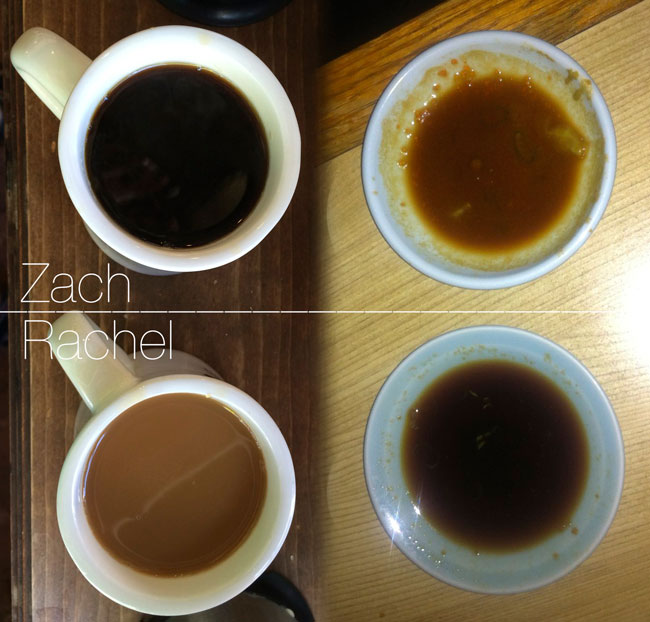
Strength of Coffee vs. strength of wasabi/soy mixture

Thursday, October 17th, 2013

I realized that the difference in color between Rachel’s coffee and mine is generally a mirror image of the difference in color between the wasabi/soy mixtures we each stir up when we order sushi. It felt deserving of a quick infographic:

Zach-And-Rachel-Coffee-And-Wasabi-Preferences

Davinci Resolve 10 public beta is nifty

Tuesday, September 17th, 2013
I graded 1 a short documentary in Davinci Resolve 10 public beta yesterday, and figure I’d share a couple of observations in case they help others.

 A node tree in DaVinci Resolve
A node tree in DaVinci Resolve. In this example, node 1 is an overall adjustment to the shot, and then nodes 2 through 4 isolate and adjust different areas of the shot separately. In this case, since it’s a moving, handheld shot, the shapes in nodes 2-4 have been tracked to stick to parts of the shot. Resolve comes with an awesome and ridiculously-fast tracker.

  1. When I first launched Resolve 10, I noticed that it could see my Resolve 9 database, but said the database was not upgradeable and thus couldn’t be used. Oy, not good. I did want to carry my ongoing projects into Resolve 10. I did a bit of research, and decided maybe if I switched my Resolve 9 database from a PostgreSQL database to the other kind of database Resolve supports, a disk database, that maybe Resolve 10 would be able to use the data. So I reinstalled Resolve 9, created a disk database, selected it, and imported each of my Resolve 9 projects one by one (this took a while). I followed the procedure outlined in an unrelated post by Peter Chamberlain of Blackmagic on their forum:
    In the database manager you can make a new Disk Database. Then make that the active DB. In the Project Manager you can select the global list of databases and select your v9 projects to import to your new Disk DB.

    This worked. When I reinstalled and launched Resolve 10, it was able to use the disk database I’d created in Resolve 9. I don’t know if the steps I took will be necessary in future versions of Resolve 10 (and I’d hope they are not, and that either the app will be able to upgrade PostgreSQL databases to its format or convert them to disk db for you), but at least this is a method that works now.

  2. Resolve 10 brings with it some delightful new features — one can now apply unlimited numbers of shapes (or “power windows”, to use the world’s worst dumbest-sounding name for a shaped selection) to a node. Multiple circles and polygons affecting the effect of a single node, check! The new ‘gradient’ shape is great, though it does seem to render to screen more slowly than the other shapes. I was excited to try out the trial version of the NeatVideo OpenFX plugin for noise reduction, but though I could apply it to a node, I got a “no parameter is exposed to the user” when trying to use it. Hopefully NeatVideo or Blackmagic will get that working. Optical flow interpolation for speed changes sounded like a very cool thing, something I use all the time in After Effects, but I got some pretty weird results from it and it seemed to lack much in the way of tweakability.
  3. The program seemed to run with more speed and stability than Resolve 9. Just a subjective observation.
  4. It worked great with my Avid Artist Color / Euphonix MC Color control surface and Eucon 3.0, but would lose the connection to the control surface every time I switched applications or Resolve was pushed to the background by an alert from some other app. I posted to the Avid forum, and a rep got on the case very quickly. Hopefully this issue gets resolved 2 soon.
If you’ve been thinking of trying out Resolve, you might as well give it a look. It’s a pretty amazing application, and it’s fantastic that BlackMagic lets us all go to town with the barely-crippled “Lite” version for free 3

I’ll link to the documentary short when it’s online.

  1. Grading is the process of adjusting the images in a video or film. Bulk adjustments like brightness, contrast, gamma, saturation, and hue. Localized adjustments within shapes tracked to objects on screen, or limited by the color or brightness of objects in the shot. It’s basically like editing images in Photoshop, except these are moving images. Every feature film and TV program goes through the grading process these days, and by grading one can really spice up or bring out the beauty of the imagery, match shots to one another, give the whole piece a “look”, or just balance things out. It’s to filmmaking what darkroom artistry was for photographic pictures, back when people shot stills on film. ↩︎
  2. I did not intend this as a pun as a typed, but recognized it as I saw the word form. Groan if you must, I’m leaving it. ↩︎
  3. OK, maybe it’s not exactly free, since it’s an engine to drive sales of their video output hardware –the only way to display a true video output signal from the software. But their video output cards are solid. ↩︎

a fantastic ftp client for mac is 50%-off for another 12 hours or so – Panic’s “Transmit”

Monday, September 16th, 2013

Looks like my favorite ftp client for mac is 50%-off for a day, on their website and in the mac app store (and app store purchases can be used on all your computers). If you don’t have it, I wouldn’t hesitate to recommend it. It’s a fantastic ftp client, which also supports dropbox, Amazon S3, and other services. It’ll also let you access ftp servers as if they’re disk drives. Nothing I’ve used comes close, except NcFTP at the command-line (and Transmit is using NcFTP behind the scenes). I paid double its current $17 price, and feel like I got a good deal.

If you do much transferring of media or projects to and fro via ftp, you should grab this.

Trailer for Spike Jonze film “Her” has been released

Sunday, August 18th, 2013
Poster-Xlarge
I spent the last year-and-a-half working on this film and, upon request, attempting to give spoiler-free explanations of its content to friends and relatives. Now I’m freed from that responsibility 1 by the Warner Bros. Pictures marketing department. Thanks Brothers!

The trailer for the new Spike Jonze film, “Her”, has been released and can be found on both YouTube and Apple Trailers. I’d recommend watching the Apple Trailers version as even at the HD setting the YouTube version is a surprisingly poor quality encode, or maybe it was downgraded automatically for my poor connection at work while Apple’s site deigned to make me wait for the higher bitrate (Apple Trailers’ preference and mine for quality over convenience match in this instance).

I’m so happy that some of the film is now on display.

For fun, see if you can spot any VFX shots. It’s amazing how seamless and ubiquitous those are these days. I think there may be 17 or so in there, all in place to help tell a story rather than simply to wow the audience or call any attention to their presence.

  1. I’m referring to the need to explain the storyline, not the responsibility of working on the film –though I have moved on to another project ↩︎

Anyone else curious when Filemaker Pro 13 will be released?

Monday, July 22nd, 2013

graph of days elapsed between releases of filemaker pro


This spreadsheet is the sort of thing I’ve done in order to guess the release date of a piece of software or hardware I’m waiting to buy. Rachel thought it was funny and encouraged me to post it here as an example of overkill/OCD.

–But maybe there’s at least one person out there waiting for the new Filemaker who’ll find this information useful. The Filemaker Developer Conference is coming up on 8/12/13. I bet version 13 of Filemaker Pro drops that week. It’s overdue if the long development cycle for Filemaker 12 is an anomaly and not a trend.

1password apps are 50% off “for a limited time”

Thursday, May 30th, 2013

I love 1password, so I figure I’d pass this along. I don’t know how long it’ll last, but according to 9to5toys:

1Password is offering their first price drop since February.  For a limited time you can grab their iOS and Mac apps at 50% off, which brings the totals down to $8 and $25 respectively.

The deal is linked in their post here.

I use this application a ton every day. I’ve used it to create strong super-long garbled passwords for websites, to store those passwords, to enter them to login to websites, and to store and credit card numbers and addresses. It has browser extensions for all major browsers that allow its interface to be used from within a web browser to log in to websites with a single click. I keep its data files encrypted and backed-up to the cloud, so it’s secure and always accessible –and 1password’s data store includes an html document with fancy javascript that can decrypt and display the stored passwords and information in a web browser. So I don’t even have to install 1password on a computer to be able to access a password if I can find my way to the cloud backup.

Basically, it’s awesome, and it will make it possible for you to stop using the same password or variations for a bunch of different websites. I highly highly recommend this application. It’s the first thing I install when I sit down to a new computer.

~Cheap and tiny 3D printer – The “Printrbot Simple”

Wednesday, May 1st, 2013
Photo of the Printrbot Simple

If any y’all have thought of building a 3D printer and have been waiting for a kit to reach your low cost and complexity threshold, this new “Printrbot Simple” might be the one. It’s from the folks who made the “Printrbot Plus” I’ve been having fun with for a while, but is tiny in comparison and costs $299 for the kit ($249 for a very short time as a beta).

Read more on their page, Introducing the Printrbot Simple.

To my eye, the design looks very interesting. Most parts I’ve printed would fit fine within its 100x100x100mm (3.5″ cube) build envelope, and something that small would be nice and portable.

Just figured I’d pass it along while the discounted beta price is in play.

Fitz and the Tantrums Video: “Out of my league”, crazy lo-fi 3D with Kinect and RGBDToolkit

Tuesday, April 23rd, 2013

Fitz and the Tantrums – Out of My League from Jordan Bahat on Vimeo.

My friend Jordan directed this music video for the band Fitz and the Tantrums (released on 4/22 on VH-1 and on the band’s web page and on vimeo in better quality), and I got to help plan and execute a technically unorthodox portion of the shoot. It’s a little odd for me to be involved on the production end of a project and to not work all the way through post-production (on films, post often lasts for more than a year) –but it was fun to shoot a bunch of stuff, hand it to the producer, and then see the final result weeks later. Now I know a little better how production folk must feel. Kudos to Jordan and producer Taylor for seeing the project through to the end.

A preview of the depth map as it was being recorded to a laptop during the shoot.
A preview of the depth map as it was being recorded to a laptop during the shoot. The different colors represent the depth at each point. Black spots represent holes in the data –areas in which no depth was recorded.
At around 30 seconds in, you’ll start to see the lo-fi 3D imagery I helped capture and visualize –point clouds and wire-mesh renditions of members of the band, rendered from various virtual camera positions.

The data was shot head-on from a fixed camera position 1, using a Canon 5DmkIII DSLR to capture video and a Microsoft Kinect sensor connected to a laptop to capture a video depth map. The DSLR and the Kinect were locked to one another with a 3D-printed mount. Jay Trautman 2 (thanks!) operated the laptop while I manned the DSLR.

The depth information for each pixel (or ‘D’) captured on the Kinect was recorded and later paired with the video info for that pixel (RGB) using a piece of free software 3 called RGBDToolkit. It’s fun to play with. If you’ve got a Kinect and a video camera, you might give it a try.

There were some even-more-ambitious 3D data capture techniques at play during the shoot, involving an array of kinects and cameras (thanks Cedric!), which I’ll talk about another time. The non-3D shots were also captured on a Red Epic camera by D.P. Andrew Wheeler and his team.

My cousin Jenny did some great storyboards for the video, if they make it into her portfolio I’ll link to ’em. A ton of other people worked on the video. I’ll link to the full credits soon if I can find them.
  1. i.e. the camera was locked into position using a tripod ↩︎
  2. I worked with him previously on The Man with the Iron Fists ↩︎
  3. free as in beer and as in “MIT license” ↩︎

Designed a part for my 3D printer – home manufacturing FTW

Saturday, March 16th, 2013
Screenshot of the model in Autodesk Inventor Fusion

I’m feeling pretty happy about this one. It’s my first somewhat complicated CAD design, and it works well. It’s a mount which holds a blower fan next to the extruder on my 3D printer and aims a stream of air towards the plastic as it prints, to cool it quickly so that the next layer is printed on a solid base.

There’s something really satisfying about measuring the dimensions of an item using calipers, sketching out a part meant to fit, designing it in a computer, printing a copy, fitting it, making changes to the design, fitting it, and ending the process with a working part that fills a need.

The files for printing and additional images are available on thingiverse.

photo of the blower fan mounted to the Printrbot+ extruder

Inexpensive and familiar-looking studio monitors coming to Monoprice

Monday, January 28th, 2013
I always think of online retailer Monoprice.com as a place to buy good and inexpensive audio and video cables, but they’ve been branching out. Recently, they’ve added microphones, an 8-channel mixer with USB IO, a $390 27″ IPS 1 WQHD 2 resolution monitor (which may be using the same panel as Apple and Dell’s 27″ IPS displays), and an interesting pair of audio monitors to their lineup. These are all the kind of items I use to outfit editing stations, so I’ll be keeping an eye on their new items. But I’m especially curious about those audio monitors.

That’s because the Monoprice “5-inch Powered Studio Monitor Speakers” look suspiciously similar to M-Audio’s BX5 monitors –the size and specifications are nearly identical 3. But Monoprice’s sell for 40-50% less money. Here’s a little comparison:

Monoprice:

  • 1″ silk dome tweeter, 30w amp
  • 5″ Kevlar cone woofer, 40w amp
  • freq response: 56Hz-22kHz
  • crossover freq: 3kHz
$165.78 a pair

M-Audio BX5-D2:

  • 1″ silk dome tweeter, 30w amp
  • 5″ Kevlar cone woofer, 40w amp
  • freq response: 56Hz-22kHz
  • crossover freq: 3kHz
$299 a pair (MSRP. $230 street)

The similarity leads me to wonder whether Monoprice and M-Audio are buying from the same factory. If so, I wonder if the speaker was originally designed by M-Audio or whether the factory sells the same model to all comers, and each company just changes the look of the enclosure. I’m always curious about manufacturing and the provenance of products, so I’m very interested to know more about how (if I’m right) both companies ended up selling almost the same speaker with a different housing and at very different price points.

Were I building an editing station from scratch right now, I’d probably be checking reviews of Monoprice’s mixer, their 27″ IPS monitor, and their audio monitors (once they are all released). These are key components of any editing system, and I’ve definitely spent beyond those prices kitting out my setup of hardware that has roughly equivalent specifications.

  1. “In Plane Switching, a very nice type of LCD panel. ↩︎
  2. 2560×1440 ↩︎
  3. There is one minor difference I spotted between these models, and that is that the Monoprice monitor includes a “four-position high-frequency bias selector switch”, which is not a feature of the M-Audio BX5-D2. But previous versions of M-Audio’s BX5 did include such switches, so maybe Monoprice’s monitor is more of a match to M-Audio’s older monitor? ↩︎